Raw data
Every sensor and command of the robot, in any browser, with no app to install. For tinkerers, and for trying what the robot can do.
The dashboard
- See and hear: live video from its camera, a snapshot, the robot's microphone.
- Talk through it: your phone's microphone or a sound file on its speaker, its mouth moving.
- Move it: nod, shake, sliders for the head's yaw and pitch, hold a position.
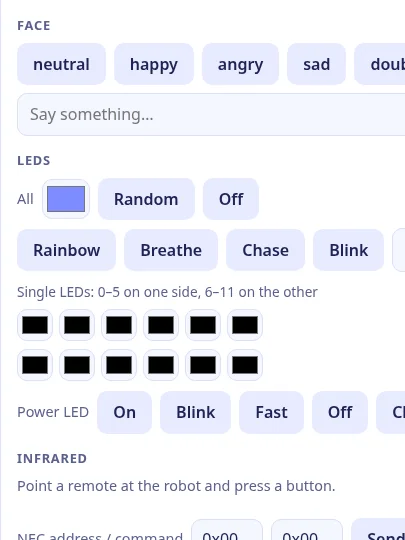
- Its face and lights: six emotions, speech bubbles, stickers, emoji or a picture from your phone; all 12 LEDs, one by one or with effects.
- Infrared and NFC: catch a TV remote's code and send it again; read tags and cards.
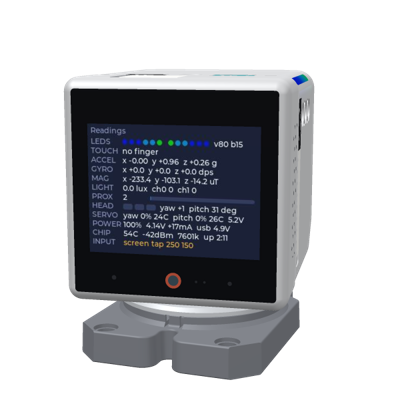
- Every sensor: motion and compass live at 100 Hz (CSV download), touch, head touch, light, proximity, the batteries, the servos' load and temperature, Wi-Fi and memory.
- Latency: a ping split into browser to server, server to robot and the robot's loop.
Privacy
With end to end encryption on, only paired browsers can read the robot: the server relays ciphertext. A robot set up on m.i41.eu has it on for Raw data.
The camera and microphone stream only while someone watches or listens, and the robot shows a red LIVE badge meanwhile. On the robot itself you can turn its camera and microphone off, or off at night: the firmware then refuses them to any app, and no app can turn them back on. Continuous rotation asks on the robot's own screen first.
Parts it uses
Every part Raw data uses and what it does with it. Pick a part to see where it sits on the 3D robot.
- Display Faces (six emotions), speech bubbles, stickers, emoji and pictures from the phone; brightness.
- Touch screen Live touch: both fingers drawn at 50 Hz; taps with coordinates in Events.
- Camera Live video (JPEG, about 5 fps), a 640×480 snapshot, mirror and flip, raw sensor registers.
- Microphones The robot's microphone, played in the browser.
- Speaker Talk from the phone, play a sound file, beep.
- Head yaw servo Nod, shake, home, a yaw slider; continuous rotation after a Yes on the robot.
- Head pitch servo A pitch slider (5–85°), nod, home, hold position.
- Servo feedback Load and temperature, supply voltage, the reported angle of each servo.
- RGB LEDs One colour for all, random, effects (rainbow, breathe, chase, blink), a picker per LED.
- Accelerometer and gyroscope Shake in Events; a live 100 Hz IMU with a CSV download; acceleration and rotation in Sensors.
- Magnetometer (compass) The magnetic field per axis (µT and raw counts), live with the IMU.
- Ambient light Room light (lux) in Sensors.
- Proximity Proximity in Sensors.
- Head touch Head touch in Events: press with the zones, release with its duration, swipes.
- NFC reader Reader on/off; a tag near the robot adds its UID, type and NDEF record to Events.
- IR receiver A TV remote's code shows up, to send again or save.
- IR transmitter Send NEC or raw codes, hold, send 3×, test the LED, self-test.
- Power/charge LED On, blink, fast, off, or charging.
- Battery Battery, charging, the CoreS3 power chip's voltages and state.
- Battery monitor (body) The body battery's voltage, current and power (INA226).
- Processor Chip temperature, Wi-Fi, free memory, uptime; ping split into its legs.
- Servo power Servo power on and off (head extras).
- Power button A press shows in Events (short or long).
- USB ports USB plugged and unplugged show in Events; USB voltage under Sensors.
Start
- Set your robot up on m.i41.eu with Raw data among its apps (one click over USB in Chrome or Edge).
- On the robot, swipe up for the app switcher and pick Raw data, or switch it from the manager's page.
- Scan the robot's QR code with your phone to pair. A paired phone can let a laptop in too.
Source
q41eu-raw: one Go server with the page built in, also for your own server at home. It holds the robot's wire protocol, which the other apps use too. MIT
A proof of concept, vibe coded and tested on a real robot at home, not reviewed by humans yet.