Pet
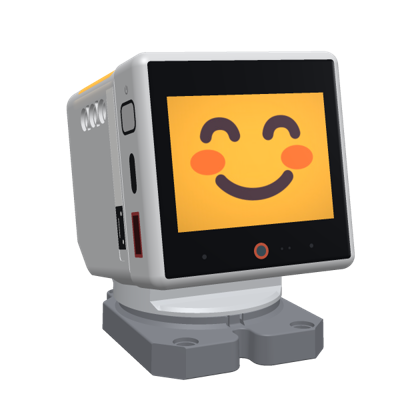
A Tamagotchi for kids, on the robot and on a phone. The pet lives on the server; the robot is its body.
Playing
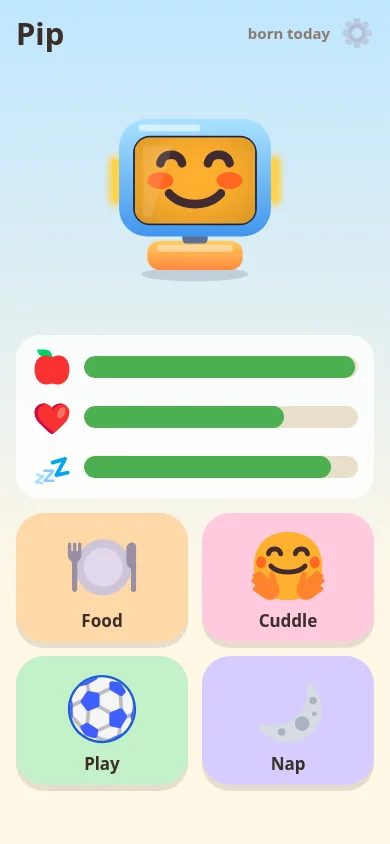
The pet has three needs, food, fun and energy, and its mood follows them. Kids feed it, cuddle it, play with it and put it to bed, on the robot itself or on the kid's page, which works with pictures, so it needs no reading.
- Stroke or press its head: a tickle, a cuddle or a scratch, each with its own line.
- Hold a food card to it: any NFC card or sticker a parent gave a food; it eats it, and is picky about the same food twice.
- Tap its screen: a menu with food, play, a nap and its needs.
- Catch the ball: five balls on the screen to tap, while the head makes each one harder, up to dodging a hand that comes close.
- The color game: the LED strips show colors, the kid presses them in order; the three best games make a podium with photos from the robot's camera.
The pet is kind: it never dies or gets ill. Neglected, it only gets sad and asks for food or play now and then. Its needs pause at night and during school hours, so it never suffers while the kid sleeps or is away.
For parents
The parent page belongs to the robot's owner: signed in on pet.q41.eu (the same sign-in as m.i41.eu), or behind a PIN for a pet at home. Kids pair with the robot's QR code and need no account.
- The daily routine: wake-up and bedtime for weekdays and weekends, school hours when the pet rests. Before bed it yawns, sings a lullaby and fades a warm night light; in the morning it greets the kid.
- Minutes of play per day (feeding is never limited), sounds, voice and volume, Czech or English.
- Food cards, the games, the leaderboard's photos (remove a place, or turn photos off).
- The faces: Fluent Emoji filling the screen, one per mood, or the robot's own face.
Parts it uses
Every part the pet uses and what it does with it. Pick a part to see where it sits on the 3D robot.
- Head touch Stroked or pressed: tickle, cuddle, long cuddle or scratch, each with its own line and fun; at night the whole palm wakes it.
- NFC reader A food card held to it: it eats the card's food (picky about the same food twice); asleep, it dreams of the food.
- Touch screen A tap opens a menu (food, play, nap, needs); a long press gets a line; in Catch the ball the kid taps the balls.
- Accelerometer and gyroscope Shaken: "Wheee!", dizzy. The accelerometer and gyro tell when the robot is in someone's hands, and then the head never moves.
- Proximity Someone comes close: a hello now and then (at most every 20 minutes); in Catch the ball the head dodges a hand coming close.
- Ambient light In Catch the ball a hand's shadow also counts as coming close; during a game the brightness is fixed so a hand near the light sensor does not dim the screen.
- Display The pet's face per mood (Fluent Emoji filling the screen, or the robot's own face), menus, food, the games and the podium.
- RGB LEDs The mood's colour; in the color game the LED strips show the colors to press.
- Speaker The pet speaks its lines (a kid's voice, streamed at speaking pace) and plays short sounds.
- Camera Takes a photo of the kid for the color game's leaderboard (a parent setting, on by default).
- Head pitch servo Lifts the sunken head back by day; moves the head in Catch the ball.
- Head yaw servo A head turned more than 30° goes back to the middle; the head circles and dodges in Catch the ball.
Start
- Set your robot up on m.i41.eu with Pet among its apps (one click over USB in Chrome or Edge).
- On the robot, swipe up for the app switcher and pick Pet, or switch it from the manager's page.
- Scan the robot's QR code with the kid's phone or tablet. The parent page is at pet.q41.eu, signed in.
Source
q41eu-pet: one Go server, also for a pet at home on your own server. MIT
A proof of concept, vibe coded and tested on a real robot at home, not reviewed by humans yet. The faces are Fluent Emoji (MIT).