Focus
A focus timer for your desk: the robot is the timer, a phone optional.
On the robot
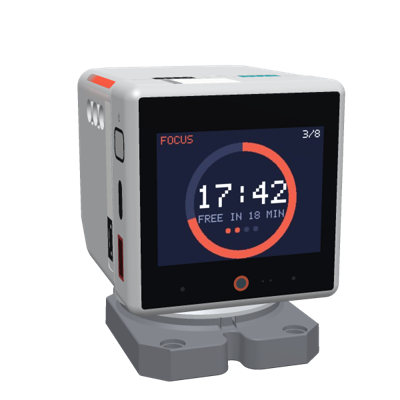
25 minutes of focus, a 5 minute break, and a longer break after every four. No phone is needed: tap the robot's screen or its head to start or pause, hold the screen to skip.
- The screen: the time left as a ring and as digits, today's count, and a line for the room: "FREE IN 12 MIN" while you focus, "STRETCH" on a break.
- The lights: both LED strips show the time left as a shrinking bar, dim: red while focusing, green or blue on a break, amber when paused. A sign for others in the room.
- At the end of a phase: a chime, and a nod after focus or a look up after a break. Each can be turned off.
A focus period cut short does not count, and nothing punishes it.
On the page
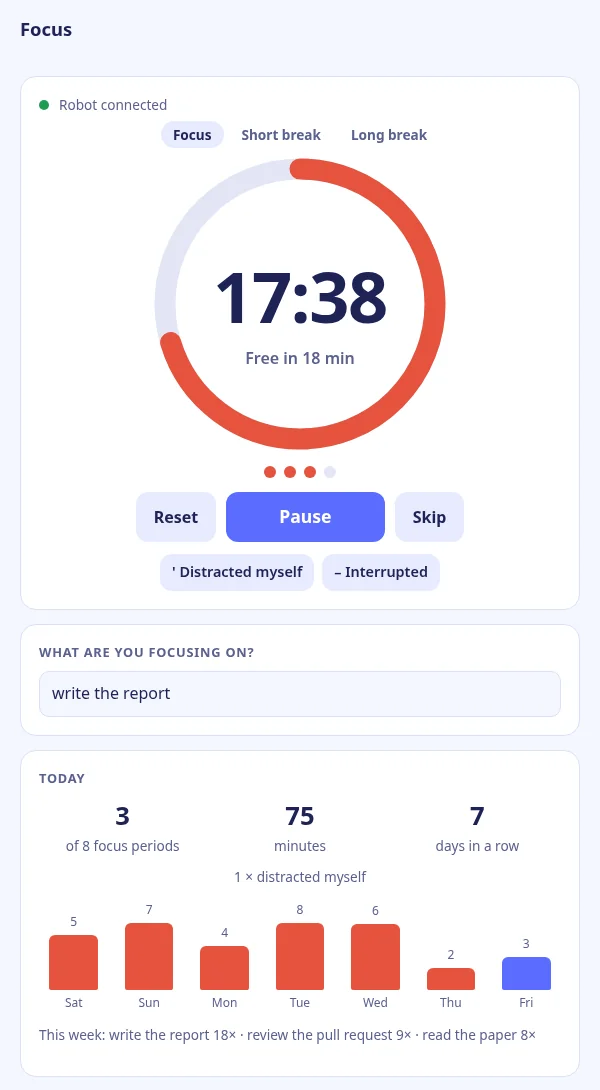
Pair a phone or computer with the robot's QR code for the rest: what you focus on, two marks for interruptions without stopping the timer, today's focus periods and minutes, days in a row, the last seven days, and the settings: 25/5, 50/10 or 90/20, a daily goal, when your day starts (for night owls), and the robot's chime, lights and moves.
Parts it uses
Every part Focus uses and what it does with it. Pick a part to see where it sits on the 3D robot.
- Display The phase, the time left as a ring and as digits, today's count, the set's dots, and a line for the room ("FREE IN 12 MIN").
- Touch screen Tap to start or pause, hold to skip to the next phase.
- Head press A touch on the head starts or pauses, as a tap on the screen does.
- RGB LEDs The time left as a shrinking bar: red while focusing, green or blue on a break, amber when paused, off when idle.
- Speaker A chime at the end of a phase: a rising bell after focus, two calm notes after a break.
- Head pitch servo A nod after focus, a look up after a break.
Start
- Set your robot up on m.i41.eu with Focus among its apps (one click over USB in Chrome or Edge).
- On the robot, swipe up for the app switcher and pick Focus, or switch it from the manager's page.
- Tap the robot to start. For the statistics, scan its QR code with your phone (swipe up, QR).
Source
q41eu-focus: one Go server, also for your own server at home. Apache-2.0
A proof of concept, vibe coded and tested on a real robot at home, not reviewed by humans yet.