Dev
Your robot for your own programs and AI agents, and a Go kit for writing new robot apps. Online at dev.q41.eu, or on a computer at home.
- A script in any language shows text on the robot, nods, lights the LEDs as a
progress bar, plays a chime: one
curleach, no robot protocol to learn. - An AI agent (Claude Code or any MCP client) shows short text, speaks in a bubble, asks you "Deploy now? Yes / Not yet" and gets the button you tapped, and hears when you pat the robot's head or hold a tag near it.
- App authors (Pet, Focus, the next one) use the same building blocks in Go, so a new robot app is a few hundred lines instead of a few thousand.
Your first program
Dev's page gives each new key with three lines for your shell:
export SDEV_URL=https://dev.q41.eu        # where Dev runs
export SDEV_ROBOT=stackchan-0a1b2c3d4e50      # your robot
export SDEV_KEY=sdev_…                        # the key: keep it like a password
Then a script shows a green card on the robot:
curl -X POST "$SDEV_URL/v1/robots/$SDEV_ROBOT/show" \
  -H "Authorization: Bearer $SDEV_KEY" \
  -d '{"title":"Build","text":"All tests pass","color":"green","progress":1}'
and Claude Code gets a body on your desk:
claude mcp add --transport http stackchan "$SDEV_URL/mcp" \
  --header "Authorization: Bearer $SDEV_KEY"
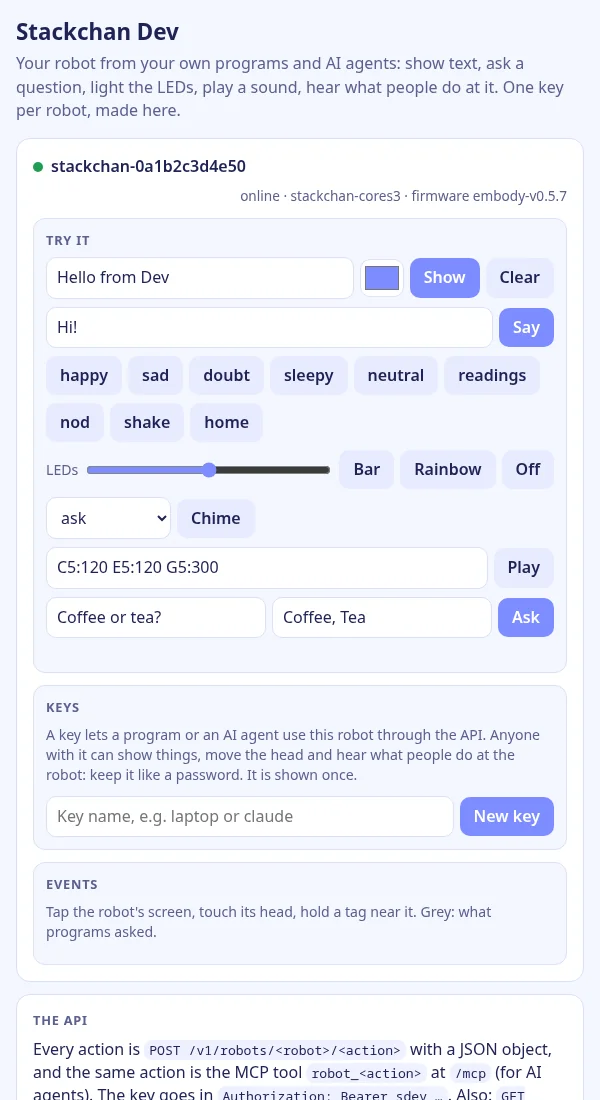
Examples in curl, Python (the standard library only) and Go: hello (a card, green LEDs, a nod, a chime), ask (a question, the answer tapped), build status (blue while your tests run, then green and a chime, or red and a shake) and events (what people do at the robot). Each also has a Run button on Dev's page, so you can try it there first.
The whole API is an OpenAPI 3.1 document at $SDEV_URL/v1/openapi.json, for
any OpenAPI tool or client generator.
The actions
Every action is POST /v1/robots/<robot>/<action> with a JSON
object, and the same action is the MCP tool robot_<action>.
- show a card with text that sizes itself, a progress bar, or a picture; say a speech bubble; face an emotion, or the robot's own readings.
- move the head (nod, shake, or yaw and pitch); leds a colour, a bar or an effect; sound a chime or a few notes.
- ask a question with 2 to 4 buttons and get the answer tapped.
- events: what a person did: a tap, a pat or a stroke on the head, shaken, picked up, someone near, a tag, a TV remote's button.
- state (online, its readings), and command for any of the robot's own commands, except switching its apps, restarting it, or turning streams on.
Keys
A key belongs to one robot, and only a browser paired with that robot (by its QR code) makes one. Dev keeps only a hash of it, lists your keys with when each was last used, and deletes them. For a robot set up by a manager, its keys show on the manager's page next to its paired browsers, and can be removed there too.
For app authors: the Go kit
- robothub: the robot side of an app: tokens, one connection per robot, pairing codes.
- robot: cards, the face, the head, the LEDs, sounds on a connected robot.
- screen, sound, leds: 320×240 cards and questions, chimes and melodies, the LEDs in the robot's order.
- gesture: the robot's raw events as what a person did.
Start
- Give your robot Dev as one of its apps: on m.i41.eu (pick Dev when you set the robot up, or add it on the robot's card), or at home with your own Dev and the home manager.
- On the robot, swipe up, tap QR, then Next until it shows Dev, and Connect. Scan its QR code with your phone, or open the link under it on your computer.
- New key on Dev's page: it is shown once, with the three
SDEV_lines for your shell. - Run an example, or give the key to Claude Code. Step by step: getting started.
Source
q41eu-dev: one Go server and the Go kit. Apache-2.0
A proof of concept, vibe coded and tested on a real robot at home, not reviewed by humans yet.